
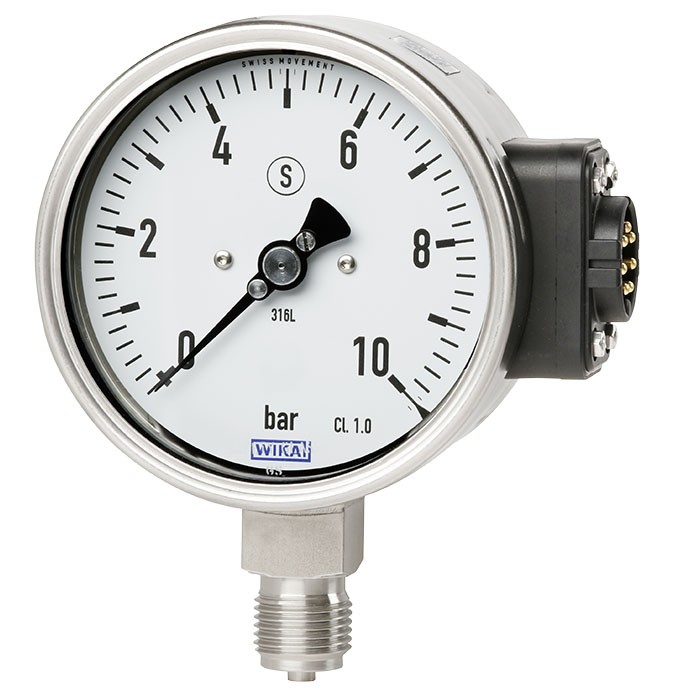
Bourdon tube pressure gauge for connection to WIKA radio unit model Typ NETRIS®3
Description
The model PGU2x.100 pressure gauge in combination with the model NETRIS ® 3 radio unit is used wherever web-based remote monitoring of the process pressure is desired in addition to on-site indication.
The model PGU2x.100 combines a mechanical measuring system with electronic signal processing and is intended for connection to the WIKA model NETRIS®3 radio unit. In this way, cloud based process and plant monitoring can be realised in industrial applications. Condition-based and preventive maintenance through centralised big data analysis is thus possible.
for further approvals, see page 6
Bourdon tube pressure gauge for connection to WIKA radio unit, model PGU23.100
The model PGU2x.100 pressure gauge fulfils safety-related requirements of the relevant standards and regulations for the on-site indication of the operating pressure of pressure vessels.
The model PGU2x is based upon a model 2xx.30 high-quality, safety pressure gauge with a nominal size of 100, which corresponds to the S3 safety version of the EN 837-1.
The WIKA measuring instrument PGU2x.100 is part of the WIKA IIoT solution. With this, WIKA offers a holistic solution for your digitalisation strategy.
Special features
- IIoT-capable measuring instrument in combination with model NETRIS ® 3 radio unit
- Mechanical on-site indication with integrated digital interface
- Intrinsically safe version Ex i per ATEX, IECEx
- Measuring ranges from 0 … 0.6 to 0 … 1,600 bar [0 ... 10 to 0 ... 20,000 psi] as well as vacuum and +/- measuring ranges
Build a PGU2X for your task
The article number is assembled automatically. If unsure — ask an engineer; we'll match the line's parameters.
- ModelPGU23
- Nominal size100
- Explosion protectionATEX / IECEx / Ex-Ukraine
- Ignition protection typeEx ia - intrinsically safe
- ZoneZone 1 gas [II 2G Ex ia IIC T4 Gb]
- Output signalUWI (Unified WIKA Interface via plug connection for angular connectors)
- Liquid Damping (case filling)without filling
- Casesolid front design EN837 "S3"
- Mounting optionwithout
- Unit of outer Scale—
- Measuring range—
- Scale range—
- 2nd Scale or Special Scalewithout
- Process connection—
- Connection locationlower mount
- Windowlaminated safety glass
- Restrictorwithout
- Pointeradjustable pointer
- Special design featureswithout
- Certificateswithout
- Approvalswithout
- Assembly accessorywithout
- Additional ordering informationWithout
Finish your configuration
Select every option to submit the request.
| Model | PGU23.100 |
| Product family | PGU2x |
| Subcategory | Wireless pressure gauge with digital interface |
| Pressure ranges | 0…0.6 bar · 0…1.6 bar · 0…2.5 bar · 0…4 bar · 0…6 bar · 0…160 bar · 0…250 bar · 0…400 bar · 0…600 bar · 0…1000 bar · 0…1600 bar · -0.6…0 bar · -1…0 bar · -1…0.6 bar · -1…1.5 bar · -1…3 bar · 0…1 bar · 0…10 psi · 0…60 psi · 0…100 psi · 0…1500 psi · 0…2000 psi · 0…3000 psi · 0…4000 psi · 0…5000 psi · 0…6000 psi · 0…10000 psi · 0…15000 psi · 0…20000 psi · 0…60 kPa · 0…100 kPa · 0…160 kPa · 0…250 kPa · 0…400 kPa · 0…600 kPa · 0…1000 kPa · 0…1600 kPa · 0…2500 kPa · 0…4000 kPa · 0…6000 kPa · 0…10000 kPa · 0…16000 kPa · 0…25000 kPa · 0…40000 kPa · 0…60000 kPa · 0…100000 kPa · 0…160000 kPa · 0…0.06 MPa · 0…0.1 MPa · 0…0.16 MPa · 0…0.25 MPa · 0…0.4 MPa · 0…0.6 MPa · 0…1 MPa · 0…1.6 MPa · 0…2.5 MPa · 0…4 MPa · 0…6 MPa · 0…10 MPa · 0…16 MPa · 0…25 MPa · 0…40 MPa · 0…60 MPa · 0…100 MPa · -0.06…0 MPa · -0.1…0 MPa · -0.1…0.06 MPa · -0.1…0.15 MPa · -0.1…0.3 MPa · -60…0 kPa · -100…0 kPa · -100…60 kPa · -100…150 kPa · -100…300 kPa · 0…10 bar · 0…16 bar · 0…25 bar · 0…40 bar · 0…60 bar · 0…100 bar · -1…5 bar · -1…9 bar · -1…15 bar · -1…24 bar · 0…160 MPa · 0…300 psi · 0…15 psi · 0…400 psi · 0…30 psi · 0…600 psi · 0…800 psi · 0…1000 psi · 0…160 psi · 0…200 psi · -30…0 inHg · -30…100 inHg · -30…15 inHg · -30…160 inHg · -30…30 inHg · -30…200 inHg · -30…60 inHg · -30…300 inHg |
| Accuracy class | 1.0 |
| Accuracy standard | EN 837-1 |
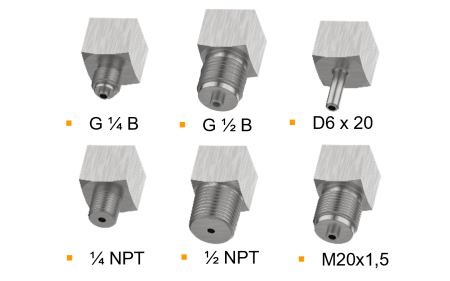
| Process connection | G ¼ BG ½ BM20 x 1.5¼ NPT½ NPTG¼B, male threadG½B, male threadM20 x 1.5, male thread¼NPT, male thread½NPT, male threadG1/4BG1/2B1/4NPT1/2NPT |
| Process temperature | −40…+100 °C |
| Output signal | Unified WIKA interface (UWI) · UWI (Unified WIKA Interface) |
| Power supply | DC 7V |
| Electrical connection | ® 3 plug connection for angular connectors NETRIS |
| Case material | Stainless steel 1.4301 (304), Stainless steel 1.4571 (316 Ti) |
| Wetted parts material | Stainless steel 316L, Monel, Stainless steel 1.4301 (304), Stainless steel 1.4571 (316Ti), Monel (for model PGU26.100) |
| Sealing material | PA6, black |
| Ambient temperature | −40…+60 °C |
| IP rating | IP54 |
| Weight | 0.636 kg |
| Certifications | CERoHSATEXIECEx |
| Explosion protection | Ex i Zone 1 gas II 2G Ex ia IIC T4 GbEx i Zone 1 gas Ex ia IIC T4 GbATEX directive Hazardous areas - Ex i Zone 1 gas II 2G Ex ia IIC T4 GbEx ia IIC T4 Gb - Ex i Zone 1 gas |
| Dial size | 100 mm |
| Datasheet languages | EN |
| Further version | ■ Oil- and grease-free ■ For oxygen, oil- and grease-free ■ Monel version; model PGU26.100 |
|---|---|
| Nominal size (NS) | Ø100 mm[4"] |
| Window | Laminated safety glass |
| Connection location | Lower mount (radial) |
| Case | |
| Design | Safety level 'S3' per EN 837-1:With solid baffle wall (solidfront) and blow-out back |
| Material | ■ Stainless steel 1.4301 (304) ■ Stainless steel 1.4571 (316 Ti) |
| Ring | Bayonet ring, stainless steel |
| Mounting | ■ Without ■ Panel mounting flange, stainless steel |
| Case filling | ■ Without ■ Silicone oil |
| Connection type | |
| Material | PA 6, black |
| Accuracy class 1) | 1.0 per EN 837-1 |
|---|---|
| Temperature error | When the temperature of the measuring system deviates from the reference temperature (20 °C [68 °F]): max.≤ ±0.4 %/10 K of full scale value |
| bar | ||
|---|---|---|
| 0 ... 0.6 | 0 ... 10 | 0 ... 160 |
| 0 ... 1.6 | 0 ... 25 | 0 ... 400 |
| 0 ... 600 | ||
| 0 ... 2.5 0 ... 4 | 0 ... 40 0 ... 60 | 0 ... 1,000 |
| 1) | ||
| 0 ... 6 | 0 ... 100 | 0 ... 1,600 |
| kPa | ||
|---|---|---|
| 0 ... 60 0 ... 100 | 0 ... 1,000 0 ... 1,600 | 0 ... 16,000 0 ... 25,000 |
| 0 ... 160 | 0 ... 2,500 | 0 ... 40,000 |
| 0 ... 250 | 0 ... 4,000 | 0 ... 60,000 |
| 0 ... 400 | 0 ... 6,000 | 0 ... 100,000 |
| 0 ... 600 | 0 ... 10,000 | 0 ... 160,000 1) |
View all (20)
| psi | ||
|---|---|---|
| 0 ... 10 | 0 ... 300 | 0 ... 3,000 |
| 0 ... 30 | 0 ... 600 | 0 ... 5,000 |
| 0 ... 60 | 0 ... 800 | 0 ... 6,000 |
| 0 ... 100 | 0 ... 1,000 | 0 ... 10,000 |
| 0 ... 160 | 0 ... 1,500 | 0 ... 15,000 |
| 0 ... 200 | 0 ... 2,000 | 0 ... 20,000 1) |
| bar | |
|---|---|
| -0.6 ... 0 | -1 ...+5 |
| -1 ... 0 | -1 ...+9 |
| -1 ... +0.6 | -1 ...+15 |
| -1 ... +1.5 | -1 ...+24 |
| -1 ...+3 |
| -60 ... 0 | -100 ...+500 |
|---|---|
| -100 ... 0 | -100 ...+900 |
| -100 ...+60 | -100 ... +1,500 |
| -100 ...+150 | -100 ... +2,400 |
| -100 ...+300 |
| kg/cm 2 | 0 ... 10 | |
|---|---|---|
| 0 ... 1 | 0 ... 16 | 0 ... 250 |
| 0 ... 1.6 | 0 ... 25 | 0 ... 400 |
| 0 ... 2.5 | 0 ... 40 | 0 ... 600 |
| 0 ... 4 | 0 ... 60 | 0 ... 1,000 |
| 0 ... 6 | 0 ... 100 | 0 ... 1,600 1) |
| MPa | ||
|---|---|---|
| 0 ... 0.06 0 ... 0.1 | 0 ... 1 0 ... 1.6 | 0 ... 16 0 ... 25 |
| 0 ... 0.16 | 0 ... 2.5 | 0 ... 40 |
| 0 ... 0.25 | 0 ... 4 | 0 ... 60 |
| 0 ... 0.4 | 0 ... 6 | 0 ... 100 |
| 0 ... 0.6 | 0 ... 10 | 0 ... 160 1) |
| -0.06 ... 0 | -0.1 ... +0.5 |
|---|---|
| -0.1 ... 0 | -0.1 ... +0.9 |
| -0.1 ... +0.06 | -0.1 ... +1.5 |
| -0.1 ... +0.15 | -0.1 ... +2.4 |
| -0.1 ... +0.3 |
| -30 inHg ... 0 | -30 inHg ...+100 |
|---|---|
| -30 inHg ...+15 | -30 inHg ...+160 |
| -30 inHg ...+30 | -30 inHg ...+200 |
| -30 inHg ...+60 | -30 inHg ...+300 |
| Unit | ■ bar ■ psi ■ kg/cm² ■ kPa ■ MPa |
|---|---|
| Increased overload safety | ■ Without ■ 1.6 times ■ 2 times |
| Vacuum resistance | ■ Without ■ Vacuum-resistant to -1 bar |
| Dial | |
| Scale layout | ■ Single scale ■ Dual scale |
| Movement | Brass |
| Pointer | |
| Instrument pointer | Aluminium, black |
| Process connection | |
|---|---|
| Standard | ■ EN 837-1 ■ ANSI/B1.20.1 |
| Size | |
| EN 837-1 | ■ G¼B,male thread ■ G½B,male thread ■ M20 x 1.5, male thread |
| ANSI/B1.20.1 | ■ ¼NPT, male thread ■ ½NPT, male thread |
| Signal type | UnifiedWIKA interface (UWI) |
|---|---|
| Signal transmission of the pressure value | The pressure value of the main scale is transmitted digitally.With dual scales, the pressure value of the second scale is not transmitted digitally. |
| Digital signal resolution | 0.04 %of measuring span |
| Connection type | NETRIS ® 3 plug connection for angular connectors |
| Material (wetted) | ||
|---|---|---|
| Process connection, measuring element | Model PGU23.100 | Stainless steel 316L |
| Model PGU26.100 | Monel ¹⁾ |
| Medium temperature range 1) | -40 ...+100 °C [-40 ...+212 °F] |
|---|---|
| Ambient temperature range | -40 ...+60 °C [-40 ...+140 °F] |
| Pressure limitation | |
| Steady | Full scale value |
| Fluctuating | 0.9 x full scale value |
| Short time | 1.3 x full scale value |
| Ingress protection per IEC/EN 60529 2) | ■ IP54 ■ IP65 (for instruments with case filling) |
| Weight | ■ 0,636 kg [1,70 lb] (for instruments without case filling) ■ 0,905 kg [2,42 lb] (for instruments with case filling) |
| Logo | Description | Country |
|---|---|---|
| EU declaration of conformity | European Union | |
| ATEX directive Hazardous areas - Ex i Zone 1 gas II 2G Ex ia IIC T4 Gb | ||
| RoHS directive IECEx Hazardous areas | ||
| Ex ia IIC T4 Gb | International | |
| - Ex i Zone 1 gas |
| Certificates | ■ 2.2 test report per EN 10204 (e.g. state-of-the-art manufacturing, material proof, indication accuracy) ■ 3.1 inspection certificate per EN 10204 (e.g. material proof for wetted metal parts, indication accuracy, calibration certificate) |
|---|
| Electrical parameters of the intrinsically safe voltage supply | |
|---|---|
| Max. input voltage Ui | DC 7V |
| Max. input current for gas applications I i | 250mA |
| Max. input power P i | 330mW |
| Effective internal capacitance C i | 4.75 μF |
| Effective internal inductance L i | Negligible |
| Temperature range | |
| Ambient temperature | -40 ...+60 °C [-40 ...+140 °F] |
| Medium temperature ¹⁾ | -40 ...+100 °C [-40 ...+212 °F] |
| NG | G | Dimensions in mm[in] | |
|---|---|---|---|
| h ±1 [0,04] | SW | ||
| 100 [4"] | G¼B | 87 [3,43] | 22 [0,87] |
| G½B | 87 [3,43] | 22 [0,87] | |
| M20 x 1,5 | 87 [3,43] | 22 [0,87] |
Couldn't find the answer in the documentation? An engineer will reply within a business day.
Ask an engineer →151 standard articles of family PGU2x
If you know the code — pick directly. If not — use the configurator in mode “01”.