
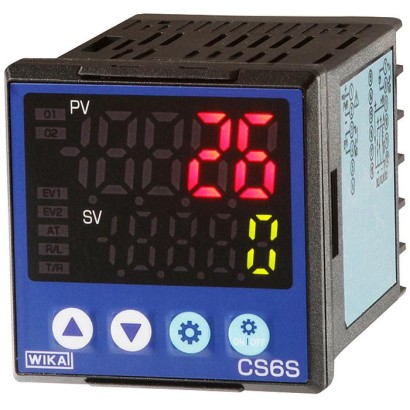
Universal controller for panel mounting
Description
The compact universal controllers of the CS6x series offer display, control and monitoring of temperatures.
The controllers feature a multi-function input, meaning the configuration of the sensor input can be set. Thus the flexibility of the controller is considerably increased, and warehousing is made easier. An alarm output for monitoring the actual value is also available as standard.
The control parameters can be set across broad ranges. Auto-tuning, which facilitates finding the optimal control parameters, can be activated.
Universal controller, model CS6S
The monitoring output can be set either as relay (for slow control), as logic level for the control of electronic solid state relays (for fast control and high current loads) or as a continuous 4 ... 20 mA output.
As options, there is a 2nd alarm output available for the monitoring of the actual value and the control loop, and a heater burnout alarm for monitoring the monitoring output, or, alternatively, a 2nd monitoring output. An RS-485 serial interface is also possible.
Special features
- Control modes, configurable (PID, PI, P, PD, ON / OFF )
- Integrated auto-tuning
- Selectable monitoring output - relay, logic level or 4 ... 20 mA
- Multi-function input for Pt100, thermocouples and standard industrial signals
- Available in 3 case sizes
Build a CS6X for your task
The article number is assembled automatically. If unsure — ask an engineer; we'll match the line's parameters.
- Model—
- Control output—
- Power supply—
- Option 1No option needed
- Option 2No option needed
Finish your configuration
Select every option to submit the request.
| Model | CS6S |
| Product family | CS6x |
| Subcategory | Universal controller |
| Temperature ranges | −200…+1370 °C · −200…+1000 °C · +0…+1760 °C · +0…+1820 °C · −200…+800 °C · −200…+400 °C · −200…+1300 °C · +0…+1390 °C · +0…+2315 °C · −200…+850 °C · −200…+500 °C · −200…+1760 °C |
| Accuracy class | ±0.1 % ±1 digit (Pt100), ±0.2 % ±1 digit (thermocouples and standard signals) |
| Output signal | relay · logic level · 4-20mA |
| Power supply | AC 100 ... 240 V, 50 ... 60 Hz or AC/DC 24 V |
| Electrical connection | Terminal connections |
| Ambient temperature | +0…+50 °C |
| IP rating | IP66/IP00 |
| Weight | 0.11 kg |
| Certifications | RoHSCE |
| Sensor type | Pt100, JPt100, Type K, J, R, S, E, T, N, PL-II, C |
| Datasheet languages | EN, DE |
| Actual value | 7-segment LED, 5-digit, red |
|---|---|
| Set point | 7-segment LED, 5-digit, green |
| Indication range | -2000 ... 10000 |
| Model CS6S | Dimensions 48 x 48x60mm |
|---|---|
| Model CS6H | Dimensions 96 x 48x60mm |
| Model CS6L | Dimensions 96 x 96x60mm |
| Number and type | 1 multi-function input for resistance thermometers, thermocouples and standard signals |
|---|---|
| Input configuration | Selectable via terminal connections and menu-driven programming |
| Resistance thermometers | Pt100, JPt100, 3-wire, max. permissible resistance per connection lead:10Ω |
| Thermocouples ■ Types K, J, R, S, E, T, N, PL-II, C (W/Re5-26) ■ Type B | max. permissible external resistance:100Ω max. permissible external resistance:40Ω |
| Standard signals (DC) ■ 0 ... 20 mA, 4 ...20mA ■ 0 ...1V ■ 0 ... 5 V, 1 ... 5 V, 0 ...10V | Input impedance 50Ω Input impedance>1MΩ Input impedance > 100 kΩ |
| Measuring time | 125 ms |
| Power supply | ■ AC 100 …240V,50…60Hz ■ AC/DC 24V |
| Monitoring outputs | |
|---|---|
| ■ Monitoring output 1 (O1) | 3 different versions are possible |
| Relay contact | Load:AC 250 V, 3 A (resistive load), AC 250 V, 1 A (inductive load, cos ϕ = 0.4) |
| Logic level | DC 0 ...12V max. 40 mA(short-circuit proof) for the control of an electronic switch relay (solid state relay, SSR) |
| Analogue current signal | 4 ... 20 mA, max. load 550Ω |
| Control mode | PID, PI, PD, P, ON / OFF (configurable) To determine the control parameters for PID control, auto-tuning can be activated. |
| Proportional band | Thermocouples, resistance thermometers without decimal point: 0 to input range limit Thermocouples, resistance thermometers with decimal point: 0.0 to input range limit Standard signals: 0.0 ...1,000.0% |
| Integral time | 0 ... 3,600 s |
| Derivative time | 0 ... 1,800 s |
| Cycle time | 1 ... 120 s (not available with analogue current signal monitoring output) |
| Hysteresis | Only available with ON / OFF control mode Thermocouples and resistance thermometers: 0.1 ... 1,000.0 °C Standard signals: 1 ... 1,000 (with a scaling of the input with one decimal point, this is taken over by the hysteresis). |
| ■ Alarm output 1 (EV1) | |
| Alarm type | For actual value monitoring, select from 24 alarm types, hysteresis and time delay, configurable |
| Switch behaviour | ON / OFF |
| Relay contact | Load:AC 250 V, 3 A (resistive load), AC 250 V, 1 A (inductive load, cos ϕ = 0.4, switch cycles: max. 100,000) |
View all (10)
| Optional functions | |
|---|---|
| Set point input (EV1, 2 points) | When the parameter memory is selected, the set point can be stored between SV1 and SV4. Set point: 2 points Short circuit: at approx.16mA |
| Alarm output 2 (EV2) | As for alarm output 1 (EV1) |
| Heater burnout alarm | Monitors the heating current using a current transformer (CT, included in scope of delivery) Rated current: 20 A, 100 A (specify when ordering!) 1-phase: detects overheating with CT1 input 3-phase: detects overheating with CT1 and CT2 inputs Adjustment accuracy: within 5 %of rated value |
| Monitoring output 2 (O2) | For 3-point control |
| Output | Logic level: DC 12V ±15 %, max. 40 mA(short-circuit proof) for the control of an electronic switch relay (solid state relay, SSR) Analogue current signal:DC 4 ... 20 mA, load max.550Ω |
| Proportional band | 0.0 to 10.0 times the proportional band of monitoring output 1 |
| Integral time | Identical to the integral time of monitoring output 1 |
| Derivative time | Identical to the derivative time of monitoring output 1 |
| Cycle time | 0.5 s or 1 ... 120 s |
| Overlap band/dead band | Thermocouples and resistance thermometers: -200.0 ... +200.0 °C Standard signals: -2000 ...+2000 (with a scaling of the input with one decimal point, this is taken over by the hysteresis). |
| Hysteresis | Only available with ON / OFF control mode Thermocouples and resistance thermometers: 0.1 ... 1000.0 °C Standard signals: 1 ... 10000 (with a scaling of the input with one decimal point, this is taken over by the hysteresis). |
| Cooling mode | ■ Air cooling (linear process, standard setting) ■ Oil cooling (1.5 times the slope of the linear process) ■ Water cooling (2 times the slope of the linear process) |
| Serial interface | RS-485 the transmission rate can be set (9,600 bps, 19,200 bps, or 38,400 bps) |
| Isolated voltage output (P24) | Output voltage: DC 24 V, 30mA Ripple voltage: within 200mV Maximum load current: DC 30mA |
| Ambient temperature | 0 ... 50 °C (32 ... 122 °F) |
|---|---|
| Storage temperature | -20 ...+50 °C |
| Humidity | 35 ... 85 %relative humidity without condensation |
| Environmental conditions in accordance with IEC 61010-1 | Overvoltage category II, pollution degree 2 |
| Material | Polycarbonate |
|---|---|
| Colour | Black |
| Ingress protection | Front: IP66, Rear: IP00 (per IEC 60529/EN 60529) |
| Weight | |
| ■ Model CS6S | 110 g |
| ■ Model CS6H | 160 g |
| ■ Model CS6L | 220 g |
| Mounting | Screw-type mounting brackets for wall thicknesses from 1 to15mm |
| Input signals | Measuring span | Measuring error | the span in% | |
|---|---|---|---|---|
| Standard | Exceptions | |||
| Current signals | ||||
| DC 0 ...20mA | -2,000 ... 10,000 1) | ±0.2 %±1digit | - | |
| DC 4 ...20mA | -2,000 ... 10,000 1) | ±0.2 %±1digit | - | |
| Voltage signals | ||||
| DC 0 ...1V | -2,000 ... 10,000 1) | ±0.2 %±1digit | - | |
| DC 0 ...5V | -2,000 ... 10,000 1) | ±0.2 %±1digit | - | |
| DC 1 ...5V | -2,000 ... 10,000 1) | ±0.2 %±1digit | - | |
| DC 0 ...10V | -2,000 ... 10,000 1) | ±0.2 %±1digit | - | |
| Thermocouples | ||||
| Type K, NiCr-Ni | -200 -200.0 ... ... +1,370 °C +400.0 °C | -328 -328.0 ... ... +2,498 °F +752.0 °F | ±0.2 %±1digit 2) ±0.2 %±1digit 2) | ≤ 0 °C: ±0.4 %±1digit ≤ 0 °C: ±0.4 %±1digit |
| Type J, Fe-CuNi | -200 ... +1,000 °C | -328 ... +1,832 °F | ±0.2 %±1digit 2) | ≤ 0 °C: ±0.4 %±1digit |
| Type R, PtRh-Pt | 0 ... 1,760 °C | 32 ... 3,200 °F | ±0.2 %±1digit 2) | ≤ 200 °C: ±6 K |
| Type S, PtRh-Pt | 0 ... 1,760 °C | 32 ... 3,200 °F | ±0.2 %±1digit 2) | ≤ 200 °C: ±6 K |
| Type B, PtRh-PtRh | 0 ... 1,820 °C | 32 ... 3,308 °F | ±0.2 %±1digit 2) | ≤ 300 °C: without details |
| Type E, NiCr-CuNi | -200 ... +800 °C | -328 ... +1,472 °F | ±0.2 %±1digit 2) | ≤ 0 °C: ±0.4 %±1digit |
| Type T, Cu-CuNi | -200.0 ... +400.0 °C | -328.0 ... +752.0 °F | ±0.2 %±1digit 2) | ≤ 0 °C: ±0.4 %±1digit |
| Type N, NiCrSi-NiSi | -200 ... +1,300 °C | -328 ... +2,372 °F | ±0.2 %±1digit 2) | ≤ 0 °C: ±0.4 %±1digit |
| Type PL-II | 0 ... 1,390 °C | 32 ... 2,534 °F | ±0.2 %±1digit 2) | - |
| Type C (W/Re5-26) | 0 ... 2,315 °C | 32 ... 4,199 °F | ±0.2 %±1digit 2) | - |
| Resistance thermometers | ||||
| Pt100 (3-wire) | -200 -200.0 ... ... +850 °C +850.0 °C | -328 -328.0 ... ... +1,562 °F +1,562.0 °F | ±0.1 %±1digit 2) ±0.1 %±1digit 2) | |
| JPt100 (3-wire) | -200 -200 ... ... +500 °C +500 °C | -328 -328 ... ... +932 °F +932 °F | ±0.1 %±1digit 2) ±1 K |
| Description | Order number |
|---|---|
| Terminal cover for model CS6S 48 x 48 mm, IP20 | 14154342 |
| Terminal cover for model CS6H 48 x 96 mm, IP20 | 14154346 |
| Terminal cover for model CS6L 96 x 96 mm, IP20 | 14154350 |
| Instrument cable incl.USB cable (USB type A) Length approx.2.2m | 14154359 |
| Current transformer CT for 20 A For heater burnout alarm | 14154426 |
| Current transformer CT for 100 A For heater burnout alarm | 14154431 |
| Logo | Description | Country |
|---|---|---|
| EU declaration of conformity ■ EMCdirective ■ Low voltage directive ■ RoHS directive | European Union |
Couldn't find the answer in the documentation? An engineer will reply within a business day.
Ask an engineer →18 standard articles of family CS6x
If you know the code — pick directly. If not — use the configurator in mode “01”.